
Why Marketing Teams Should Learn Claude Before Anything Else

Here’s an observation worth examining: the first AI tool marketing teams should master isn’t ChatGPT for copy. It’s not Midjourney for design. It’s Claude—specifically Claude with connectors and the ability to work directly in existing tools.
This isn’t casual positioning. Over the last decade, specialized tools have been recommended to marketing teams: HubSpot for CRM, Airtable for databases, Figma for design, Loom for video. Each does one thing well. But they fragment workflow.
Claude is different. It’s a force multiplier that makes the entire toolkit more efficient. And it scales as marketing operations grow.
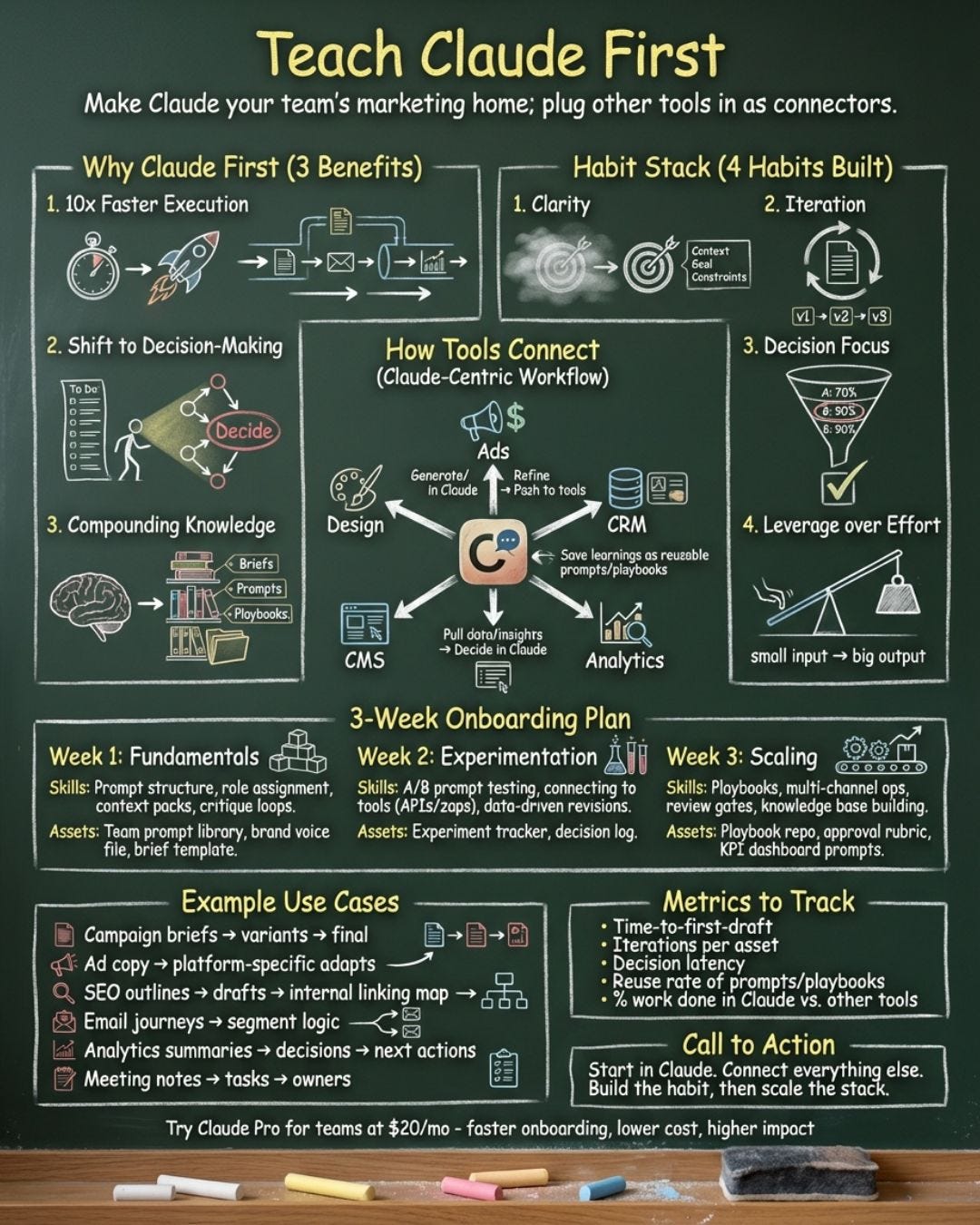
The reason becomes clear when examining how teams approach tool adoption and the foundational skills required.
The Problem with Learning Tools in Order
Marketing teams typically adopt tools in sequence:
1. Learn Notion for planning
1. Learn Excel for analytics
1. Learn Miro for strategy
1. Learn HubSpot for CRM
1. Learn Figma for design
1. Learn Zapier to connect everything
Each tool demands:
• A learning curve (1–3 weeks to proficiency)
• Tool-specific expertise (formulas in Excel, layout in Figma, etc.)
• Integration work (connecting tools that don’t talk to each other)
• Maintenance (keeping data synchronized across platforms)
The constraint? The person. The marketer has to be fluent in all of them.
The alternative: Learn Claude first. Then learn tools as connectors, not as primary platforms.
Why Claude Should Be the Foundation
Claude isn’t a replacement for tools. It’s a multiplier for tools.
What Claude does:
• Understands context across multiple sources
• Executes complex workflows
• Reads data and generates insights
• Writes, designs, and analyzes
• Connects to existing platforms
Practically, this means learning:
1. How to describe a workflow in natural language
1. How to let an AI handle execution
1. How to verify output and iterate
1. How to work in native tools (Miro, Notion, Excel) without leaving Claude
This is a meta-skill. It’s not specific to one tool. It transfers to every subsequent tool learned.
The Three Outcomes That Prove It
Three real workflows show how learning Claude first transforms approach to other tools.
Outcome 1: Operators Build Faster
Without Claude:
Creating a marketing funnel in Miro means:
1. Open Miro
1. Manually create boxes and connectors
1. Color-code stages
1. Annotate with customer actions
1. Share with the team
Timeline: 45–60 minutes.
With Claude:
1. Upload marketing strategy to Claude
1. Request: “Build a 6-stage funnel in Miro with these stages...”
1. Claude connects to Miro, creates the funnel, handles formatting
1. Verify and share
Timeline: 5 minutes.
This is a 10x speedup. Not because Claude is magic—because Claude handles execution, and the team handles decision-making.
Learning Claude this way internalizes a principle: Don’t do work that AI can do better. Save effort for decisions only humans can make.
That principle then applies to every other tool. Figma usage changes. Excel usage changes. Notion usage changes. The question becomes: “What can the AI do here?”
Outcome 2: Focus Shifts from Execution to Decision-Making
Most marketing work actually bundles two things:
1. Decision-making (What should the customer journey look like? What story does the data tell? What are top content ideas?)
1. Execution (Building the diagram, formatting the Excel, organizing the Notion)
Marketing tools force both. Decide and execute. This is exhausting.
Claude separates them.
Decision + Execution with Claude:
Give the decision: “I want a customer journey with these six stages.”
Claude handles execution: building it in Miro, color-coding, formatting, structure.
Get the output. Iterate on the decision: “Actually, let’s combine awareness and consideration into one stage.”
Claude re-executes.
This is fundamentally different work. Once learned with Claude, it applies everywhere. Other tools verify decisions, not execute them.
Outcome 3: Knowledge Compounds
Learning tools in sequence teaches tool-specific knowledge. Excel knowledge doesn’t help in Notion. Miro knowledge doesn’t help in Figma.
But Claude knowledge compounds.
Learning how to brief Claude effectively teaches:
• How to describe a problem clearly
• How to break complex workflows into steps
• How to verify outputs
• How to iterate based on feedback
These skills transfer to every tool. They transfer to team communication. They transfer to work structure.
A marketer fluent in Claude works differently than one who just knows the tools. Faster because they’re not context-switching. Clearer because they’ve practiced articulating workflows. More ambitious because they know what’s possible.
The Three Use Cases That Demonstrate the Pattern
Three concrete examples show why Claude is foundational.
Use Case 1: Customer Journey in Miro
The traditional competency path:
1. Learn Miro (shapes, connectors, collaboration)
1. Learn design principles (hierarchy, color, layout)
1. Build several funnels to internalize patterns
1. Timeline: 3–4 weeks to competency
With Claude first:
1. Learn Claude + connectors in 1 day
1. Build 10 customer journeys in Miro by asking Claude
1. Internalize what good funnels look like by watching Claude build them
1. Become expert in strategy (what makes a good funnel) rather than tool mechanics
1. Timeline: 1 week to competency
Reach competency faster and learn strategy, not tool mechanics.
Use Case 2: Data Analysis to Reports
The traditional path:
1. Learn Excel (formulas, pivot tables, charts)
1. Learn PowerPoint design
1. Learn data analysis principles
1. Build a few reports to practice
1. Timeline: 4–6 weeks to competency
With Claude first:
1. Upload data to Claude, request an analysis
1. Claude builds the Excel workbook and PowerPoint in 10 minutes
1. Now there’s a template to learn from
1. Understand what a well-structured report looks like before learning the tools
1. When learning Excel and PowerPoint, learn to iterate on Claude’s work, not starting from scratch
1. Timeline: 2 weeks to competency
The Claude-first approach inverts the learning curve. See good outputs first and reverse-engineer the tool skills.
Use Case 3: Competitive Research to Content Calendar
The traditional path:
1. Learn research methods (what to look for, how to analyze)
1. Learn Notion (databases, relations, filters)
1. Manually research competitors
1. Build a content calendar from research
1. Timeline: 2–3 weeks per content calendar
With Claude first:
1. Give Claude 5 competitor URLs
1. Claude analyzes them, extracts hooks, identifies patterns
1. Claude builds the content calendar in Notion
1. Review and iterate on the insights (not the execution)
1. Timeline: 30 minutes per content calendar
Once seeing Claude do this, understand what a good content calendar looks like. Know what hooks matter. Understand the structure. Hand-building one is faster because the pattern is clear.
The Confidence Factor
Learning marketing tools is intimidating.
Open Miro and face a blank canvas. How even start? Open Excel with a dataset and think: “I could spend 3 hours or just guess.”
Claude eliminates the intimidation. It shows what’s possible. It gives a working artifact to iterate on.
Once seeing Claude build a customer journey, a Miro funnel is no longer intimidating. Know what it should look like.
Once seeing Claude build a report, an Excel workbook is no longer a mystery. Know what good structure is.
This confidence compounds. Marketers learning Claude first are more ambitious. They try harder things. They fail faster. They iterate quickly.
Marketers learning tools first are often blocked by “I don’t know how to do this.” Marketers learning Claude first are often enabled by “Claude showed me how, now I can build on it.”
The Organizational Case
For marketing leaders, here’s the case for making Claude the first tool teams learn:
Cost argument: Claude Pro is $20/month per person. Miro, Notion, and Excel might total $40–55/month. Claude reduces tool costs while improving speed and quality.
Onboarding argument: Claude onboarding takes 2–3 days. Tool onboarding takes weeks. Quickly scaling marketing team productivity means teaching Claude first.
Compounding argument: Claude knowledge compounds across all tools. Tool knowledge is isolated. Investment in Claude training yields returns across Miro, Notion, Excel, and tools not yet adopted.
Retention argument: Marketers feeling empowered (because Claude makes them faster and more capable) stay longer. Marketers feeling overwhelmed by tool proliferation leave faster. Claude reduces tool overwhelm.
How Claude Shapes Better Marketing Habits
Learning Claude first doesn’t just make teams faster. It shapes better marketing habits.
Habit 1: Clarity of thought
Briefing Claude requires articulating exactly what’s wanted. This forces clarity. Many marketers succeed not because they’re smarter, but because they’re clearer. Claude reinforces this.
Habit 2: Iteration over perfection
Claude outputs are starting points, not endpoints. This teaches iteration. “Claude, build this. Now adjust that. Now add this.” This is how good marketing work happens.
Habit 3: Focus on decisions, not execution
Learn to distinguish between what requires expertise (strategy, messaging, creative direction) and what AI does (building, formatting, structuring). This reclaims focus.
Habit 4: Leverage over effort
Claude teaches that work doesn’t have to be hard to be good. Admire insight delivered in 10 minutes, not effort spent over 4 hours. Claude makes this obvious.
The Honest Limitation
What Claude is not:
Claude isn’t a replacement for expertise. A marketer without understanding customer journeys won’t suddenly excel at strategy using Claude. Claude amplifies expertise—it doesn’t create it.
Claude isn’t specialized enough to replace domain-specific tools for extreme requirements. Managing a $50M ad budget requiring real-time bidding analysis needs specialized tools.
But for 80% of marketing work? Claude is better than learning tools in sequence. Faster, cheaper, and it compounds knowledge in ways isolated tool learning doesn’t.
Getting Teams Started
To onboard marketing teams to Claude:
Week 1: Fundamentals
• Each person subscribes to Claude Pro
• Go through one complete workflow together (e.g., customer journey in Miro)
• Practice briefing Claude clearly
• See it work in native tools
Week 2: Experimentation
• Each team member picks one regularly-done workflow
• Replace it with a Claude-first approach
• Document the time savings
• Share results with the team
Week 3+: Scaling
• Identify the 5–10 workflows repeated monthly
• Batch them into Claude prompts
• Create templates for the team
• Measure impact: time, quality, cost
Why This Matters Right Now
AI is no longer a “future skill.” It’s a current requirement. But most marketing teams are treating it as specialist skill when it should be foundational.
You don’t hire a marketing manager and say, “Learn Excel before you start.” Excel is a tool they use.
Claude is different. Claude should be the first tool learned because it makes every subsequent tool—and every subsequent job—more efficient.
Marketing teams realizing this first will have a 2–3 year advantage over teams treating Claude as an add-on.
Most teams are still treating Claude as an add-on.
For marketers: start today. Load your next project into Claude. See how fast execution becomes.
For marketing leaders: make Claude onboarding the first priority. Don’t wait for perfect processes. Get teams using it immediately. Process improvements follow.
The tools won’t matter. Execution will.
And Claude makes execution faster than anything else teams can learn right now.
What’s one workflow in the marketing operation that would collapse into a Claude prompt? That’s the starting point.